docs/synthetic_slam/results/. Distances are in the model's own units: one camera cannot measure absolute scale.1 · From pixels to a map
What the pipeline does, before the details
SLAM (simultaneous localisation and mapping) answers two questions from a moving camera at once: where was the camera at every moment, and what does the world around it look like? Classical systems such as ORB-SLAM answer them by matching keypoints between frames and refining poses and 3D points together in an iterative optimisation called bundle adjustment.
AMB3R-SLAM takes a different route. Its core is a feed-forward 3D model, Depth Anything 3: hand it a batch of images and, in a single forward pass with no iterations, it returns where each camera was, how far away every pixel is, and how confident it is. The catch is that one pass only fits a few dozen frames. The system's contribution is everything around the model: a light front-end that tracks every frame, and a hierarchical backend that stitches hundreds of passes into one consistent map. These are its eight stages.
Input
- One camera, plain RGB: no depth sensor, no IMU, no LiDAR
- Uncalibrated: the model estimates the focal length
- Any frame rate; below 10 Hz the run is told the rate
Models
- Front-end: DA3-Small, every frame
- Backend: DA3-Nested-Giant-Large-1.1, encoder weights in bf16 (2.68 GB)
- Both are feed-forward: one pass, no iterations, no training on this scene
Output
- A camera pose for every frame
- A dense coloured point cloud, every kept pixel of the mapped frames
- Here, every stage's intermediate results too, from our tracer
2 · Six seconds that never happened
A text prompt, one generation, one take
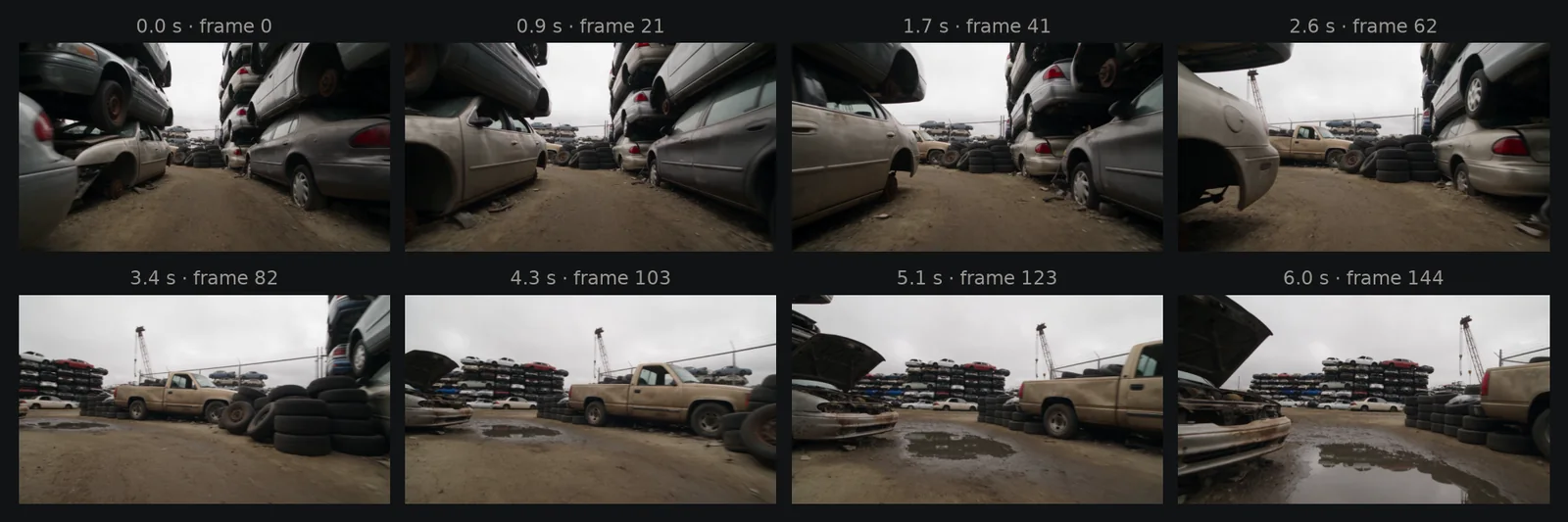
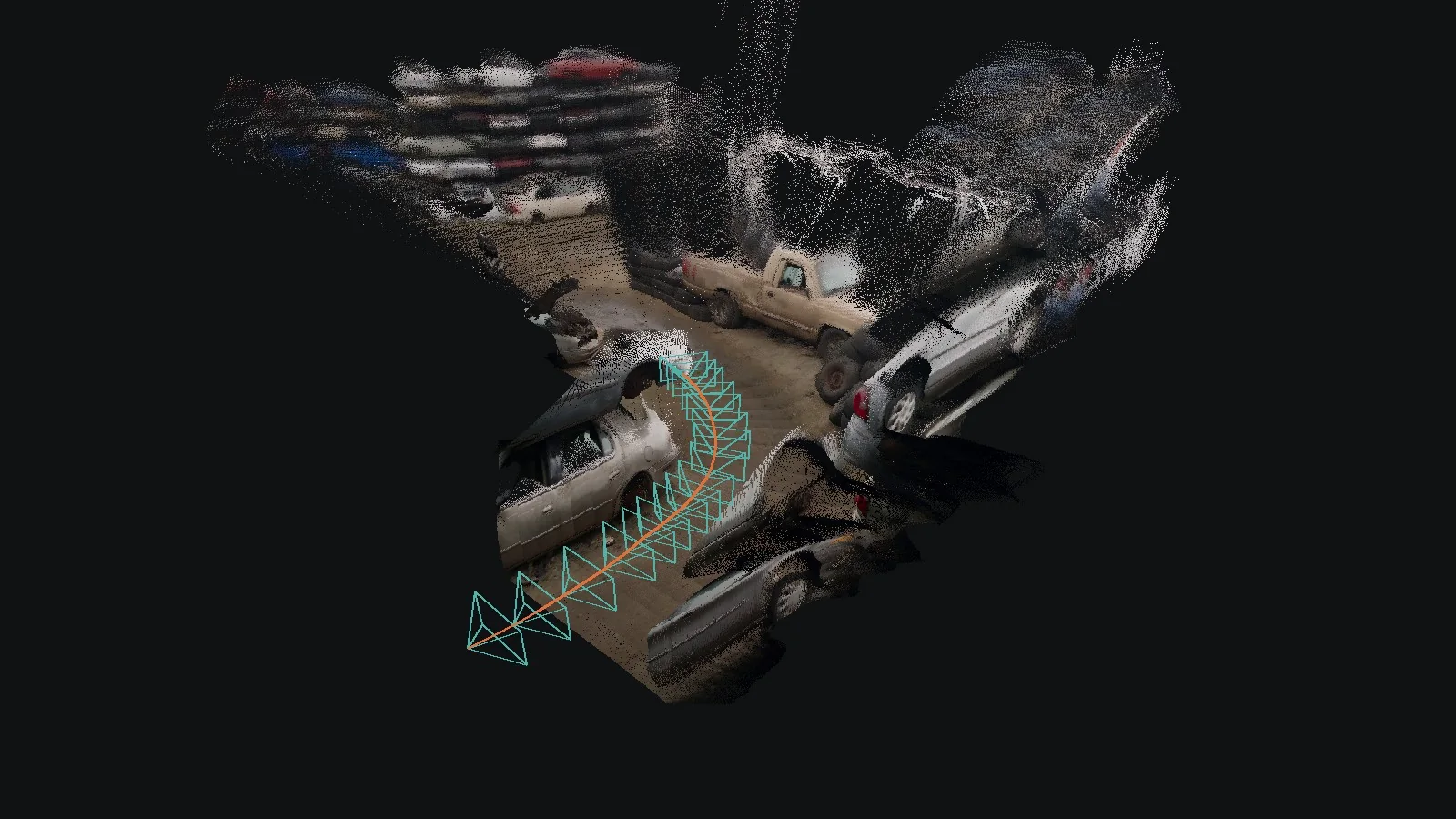
We wanted footage from a small robot's point of view in an industrial setting, and no robot to film it with. Seedance 2.5 generated it from a prompt: a camera 30 cm above the ground rolling down a dirt lane between stacked wrecks, curving left past tyres and a pickup truck, then past a car with its hood open. One generation at 720p, 6 s long, took 178 s on the provider's side, and we used the first result.
The video is 1280 × 720 at 24 fps: 145 frames. Nothing else goes into SLAM: no camera calibration, no depth, no motion sensor.
docs/synthetic_slam/.3 · Stage 1: frames
What the model actually sees
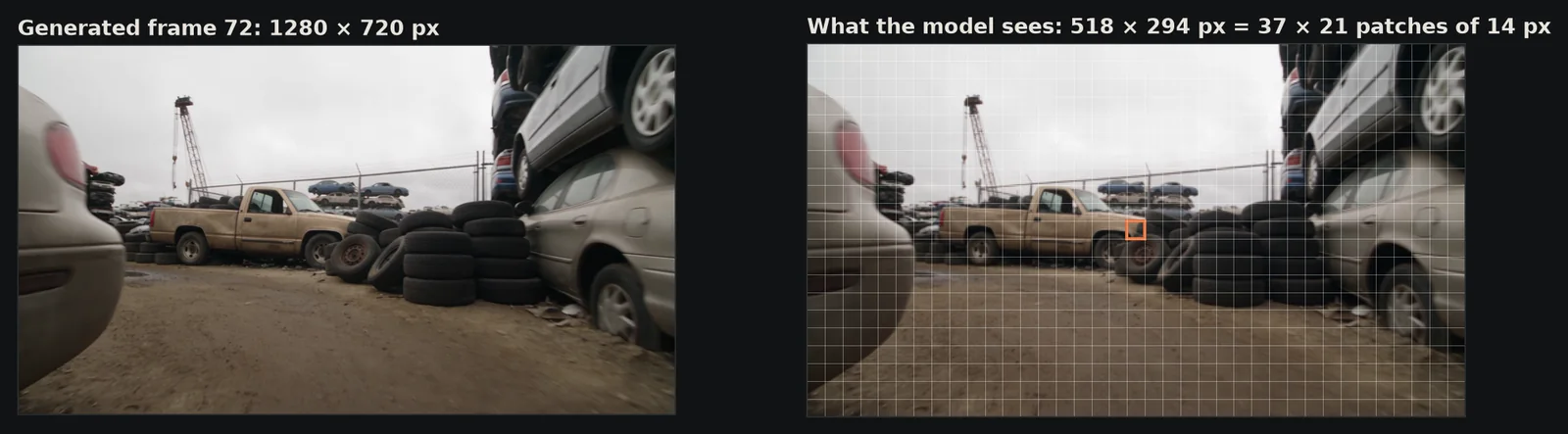
Depth Anything 3 is a vision transformer: it cuts each image into 14 × 14-pixel patches and reasons about those. AMB3R-SLAM resizes every frame so the long side is 518 pixels, here 518 × 294, a grid of 37 × 21 patches. Fine detail below a patch is blurred into its neighbourhood; this is why the map is soft at small scales.
The frame rate sets how many frames each submap spans. At 10 Hz or more, the backend takes about one frame in four; a 24 fps clip is well above that.
4 · Stage 2: front-end tracking
A pose for every frame, from four views
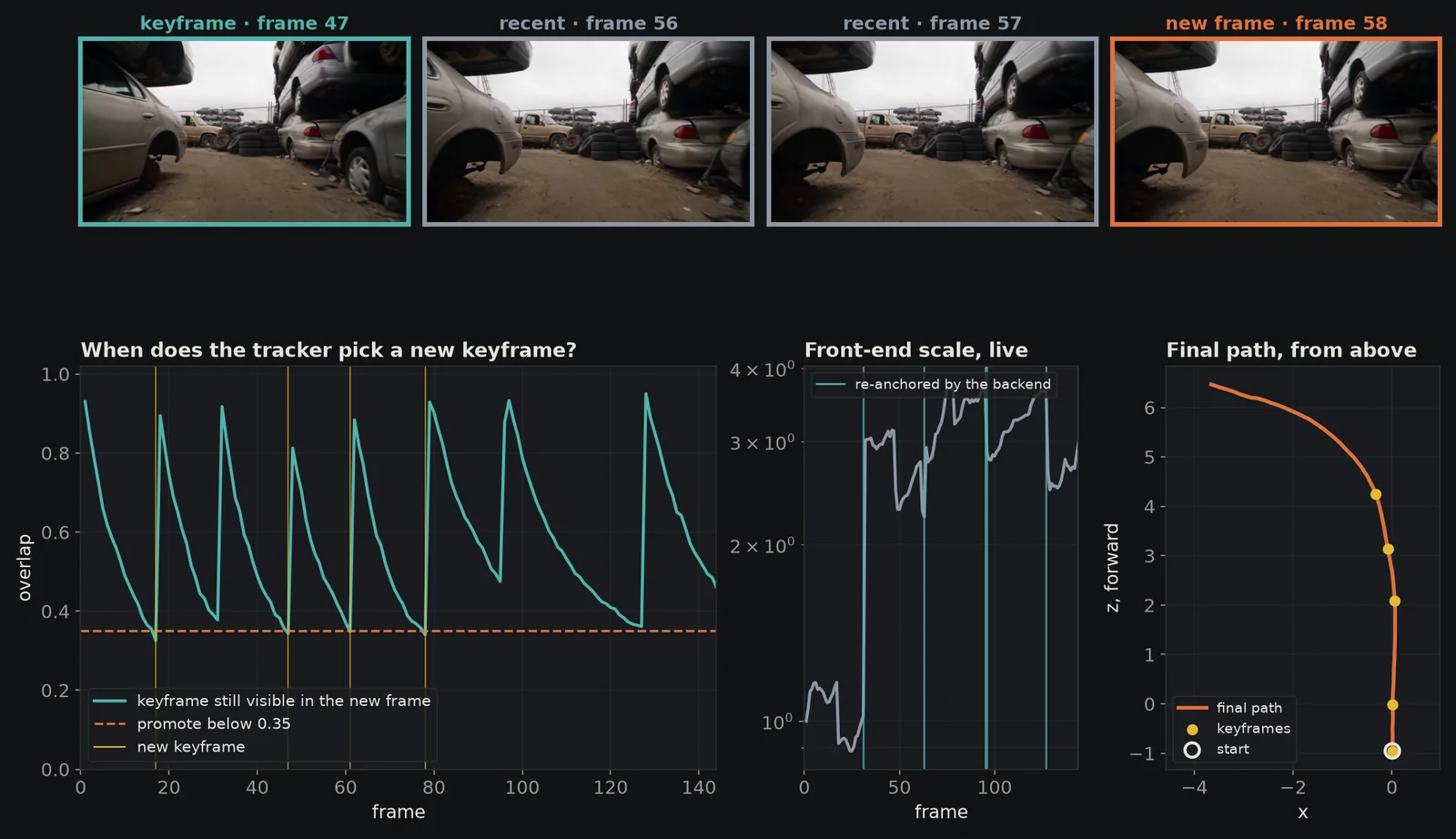
For each new frame, the small model DA3-Small sees four images together: the current keyframe, the two most recent frames and the new one. It returns their relative poses; the front-end fits a Sim(3) transform, with its scale taken from the keyframe's depth, and that gives the new frame's pose. It ran 144 times, once per frame after the first, for 3.99 s of model time.
A keyframe is the reference the tracker leans on. When less than 35% of the keyframe is still visible in the new frame, or 32 frames have passed, the new frame becomes the keyframe; that happened at frames 0, 17, 47, 61 and 78. And every 32 frames the backend hands the front-end a fresh keyframe: its own newest frame, with its depth.
rozgo/amb3r-slam,
commit 552e17f): the front-end now takes its scale from its keyframe's depth and restarts from the
backend's poses at each hand-off. Its live path now stays within 1% of the final one here (RMS), and on the
real 13-minute Oxford walk of chapter 12 its error against the laser ground truth fell from 39.7 m to 3.9 m.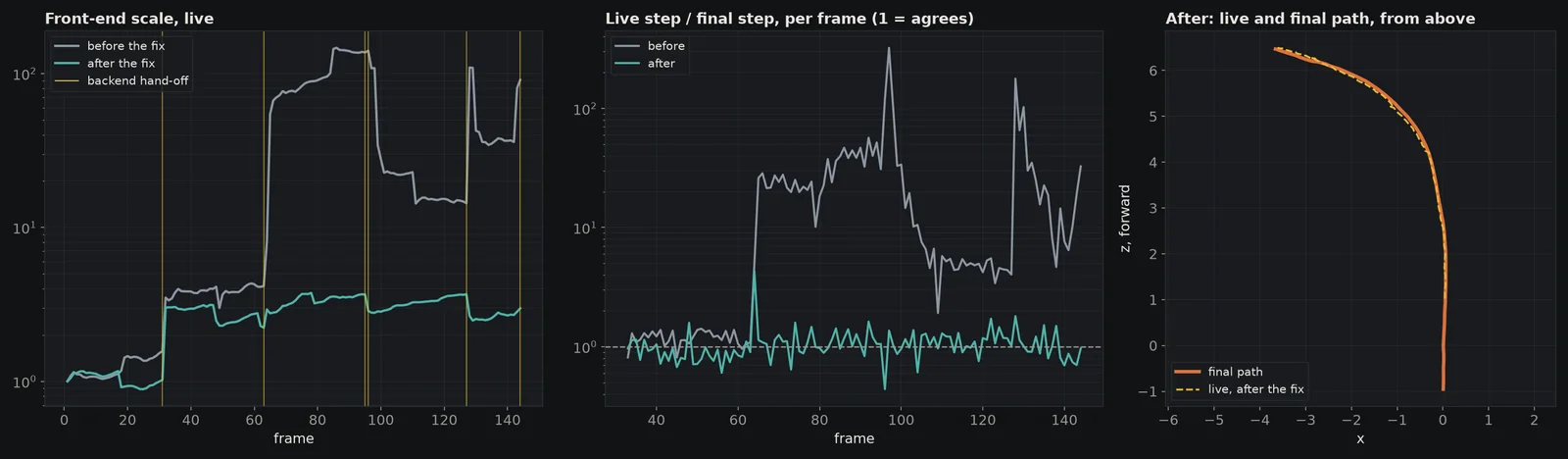
junkyard_v1_reanchor_fix.json and
spires_christ_church_05_live.json in docs/synthetic_slam/results/.5 · Stage 3: submaps, the feed-forward pass
32 views in, poses and depth for every pixel out
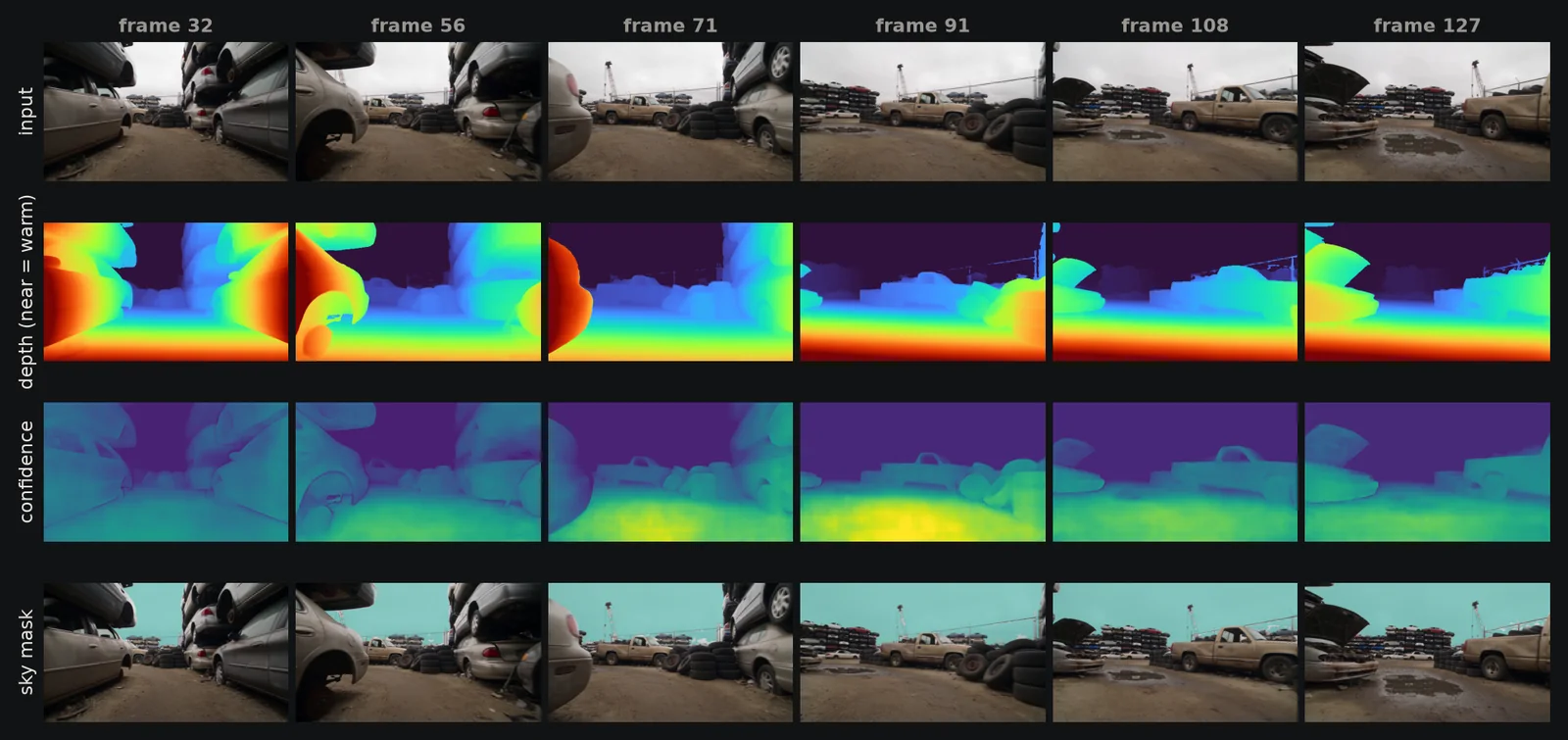
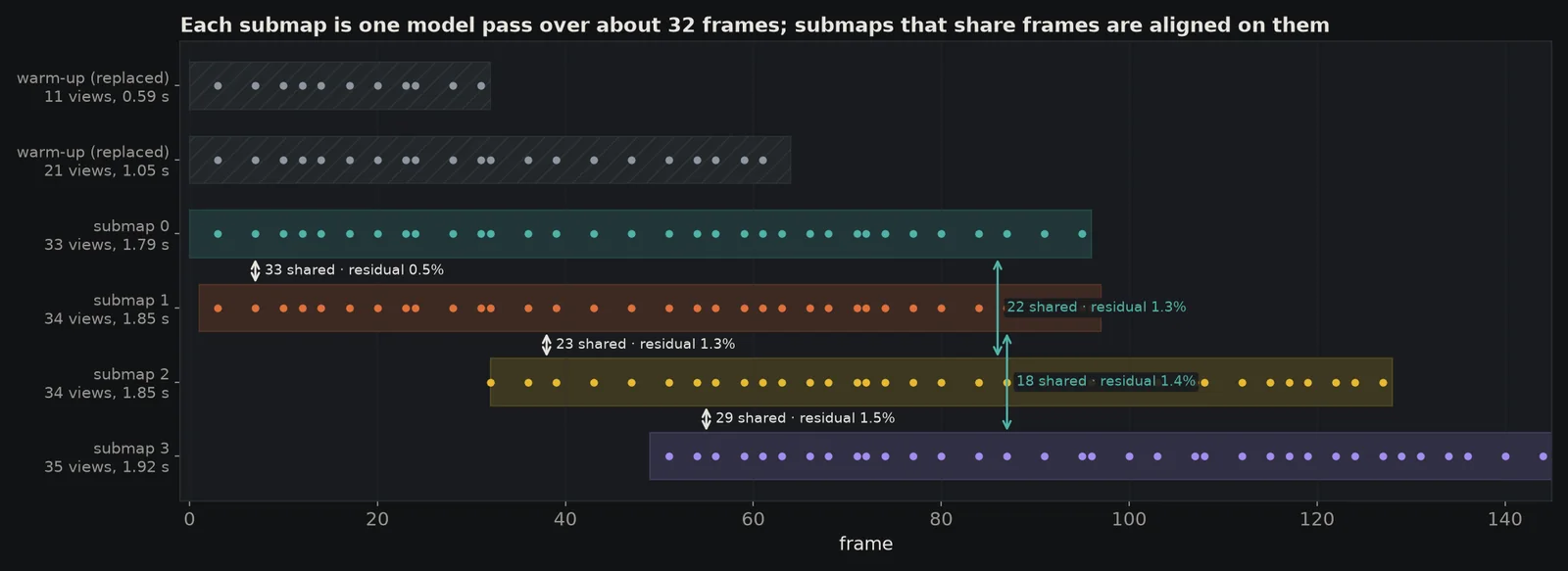
This is where the 3D comes from. Every 32 frames the backend takes the last 96 frames, keeps the front-end's most confident frame in each group of four, adds frames so no gap exceeds four, and hands those 33 to 35 views to DA3-Nested-Giant-Large in one pass. Out come, for every view, a camera pose, a depth for every pixel, a confidence for every pixel, the camera intrinsics and a sky mask. That set, in its own coordinate frame and units, is a submap.
Each pass took 1.79 to 1.92 s on the RTX 4090. Two short warm-up passes (11 and 21 views, at frames 31 and 63) gave the robot a map before the first full window; both were replaced. The model estimated a focal length of about 248 × 239 pixels at the 518 × 294 input, a horizontal field of view of about 93°, which suits a low robot camera.
6 · Stage 4: stitching submaps
Sim(3) on shared frames
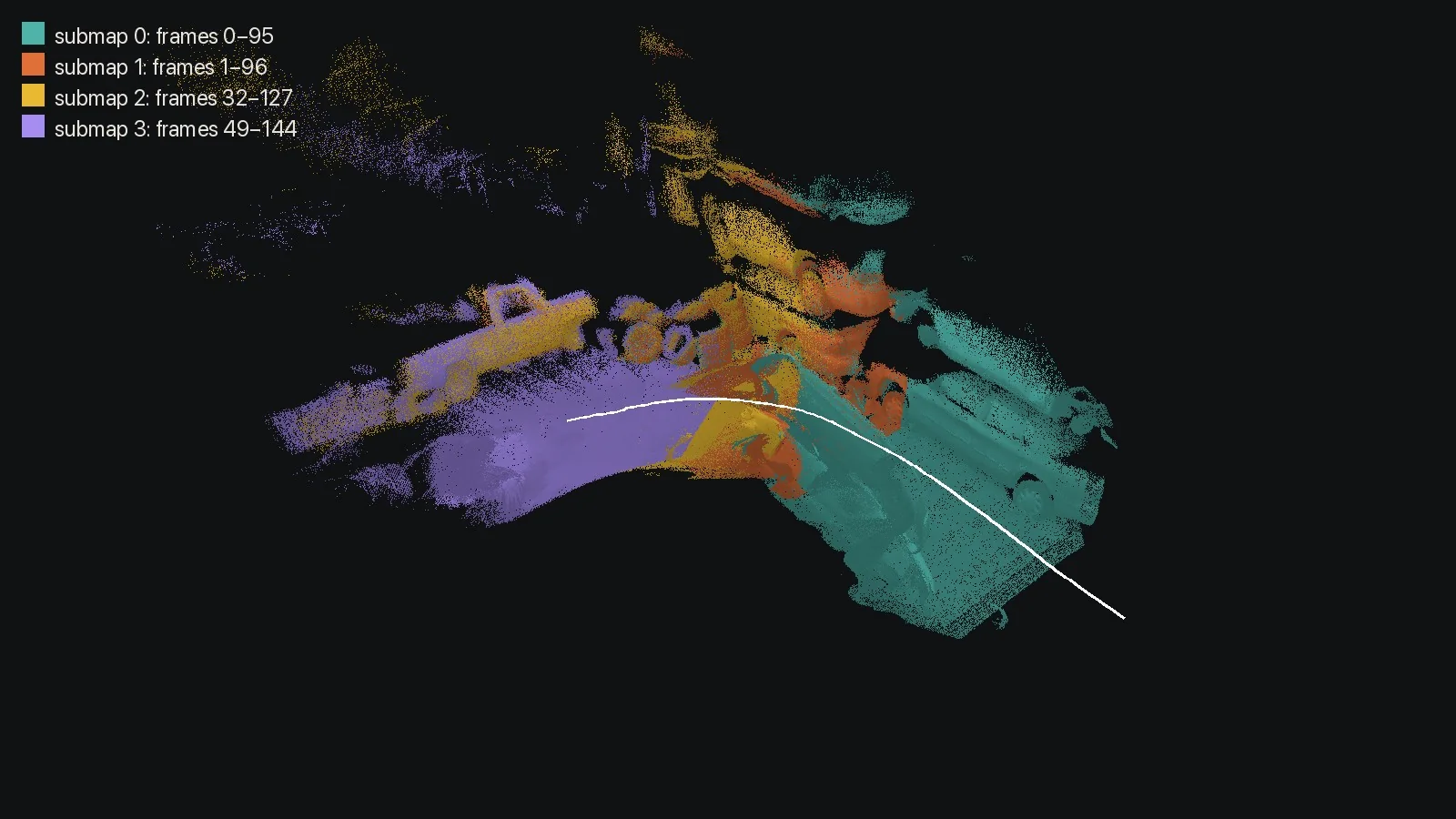
Every submap has its own origin and its own scale: a single camera cannot tell a small near scene from a large far one. But consecutive submaps overlap, and the frames they share appear in both. Fitting their two reconstructions of those frames gives a Sim(3) transform (a scale, a rotation and a translation) that places the new submap in the old one's frame. Scale comes from depth ratios; rotation and translation from the shared cameras.
Each new submap is aligned to its predecessor, and to the one before that when they still share frames. The five alignments here shared 18 to 33 frames and fitted with relative residuals of 0.54% to 1.51%, in 0.03 s in total.
7 · Stage 5: long-context links
Checking far-apart submaps against each other
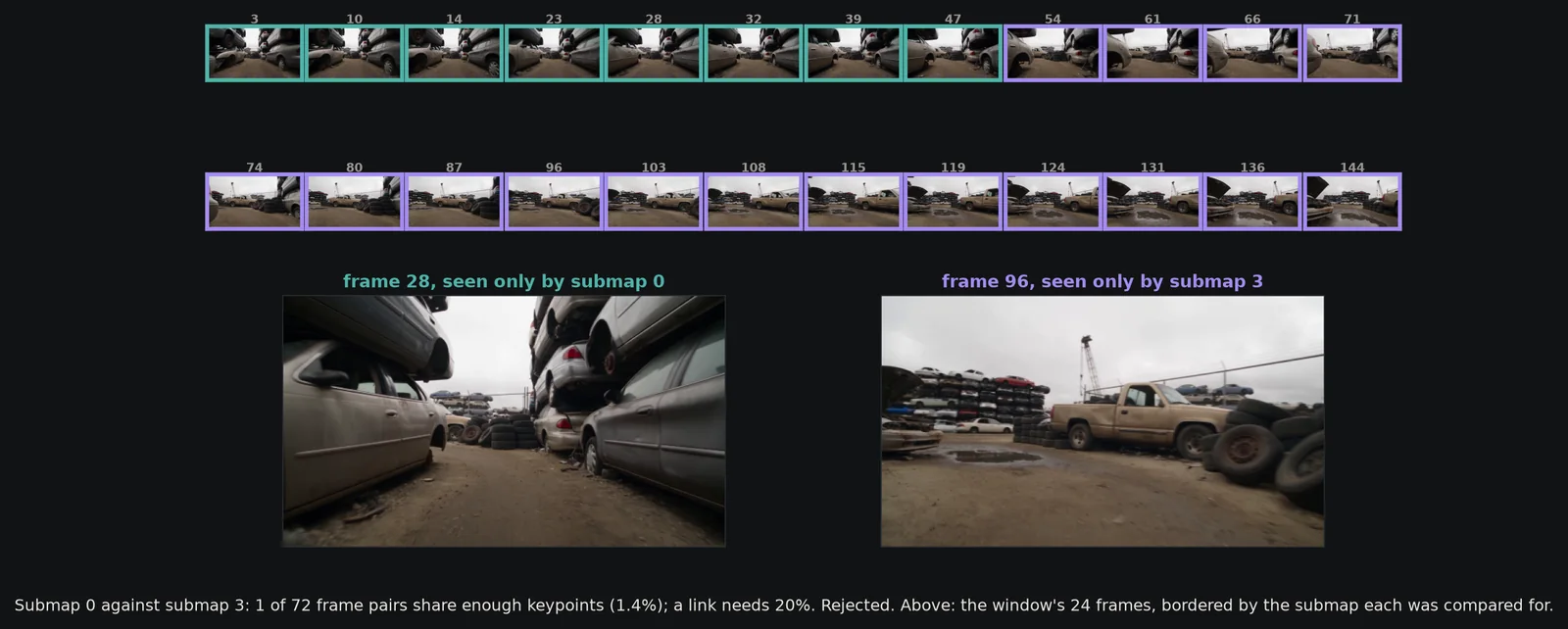
Alignment between neighbours accumulates small errors, like a chain. Long-context mapping adds links between submaps that are not neighbours: one extra pass over 24 frames spread across a window of up to eight submaps. If two distant submaps both fit that pass well, the pass links them directly. A link is only kept if the two submaps actually see the same place, which ALIKED keypoints test: at least 20% of their frame pairs must share enough matched keypoints.
Here the window covered all four submaps in one 24-view pass (1.24 s). The only far-apart pair, submaps 0 and 3, failed the test: 1 of 72 frame pairs (1.4%). That is right: the robot's first frames and its last frames look at different parts of the yard.
8 · Stage 6: loop closure
"have I been here before?"
On long routes, the strongest correction comes from recognising a place seen earlier. Every fifth frame the backend adds the image to a DBoW2 bag-of-words database (ORB features against a fixed vocabulary) and asks for the most similar earlier frame at least 100 frames back. A candidate is then verified by reconstructing both places together in one pass, and checking that they overlap and fit their own submaps before it becomes a loop edge.
This clip has 29 probes and no revisits: the robot never comes back, so no candidate was proposed. On the 13-minute Oxford walk in chapter 12, the same stage closed one loop.
9 · Stage 7: the pose graph
One optimisation over every link
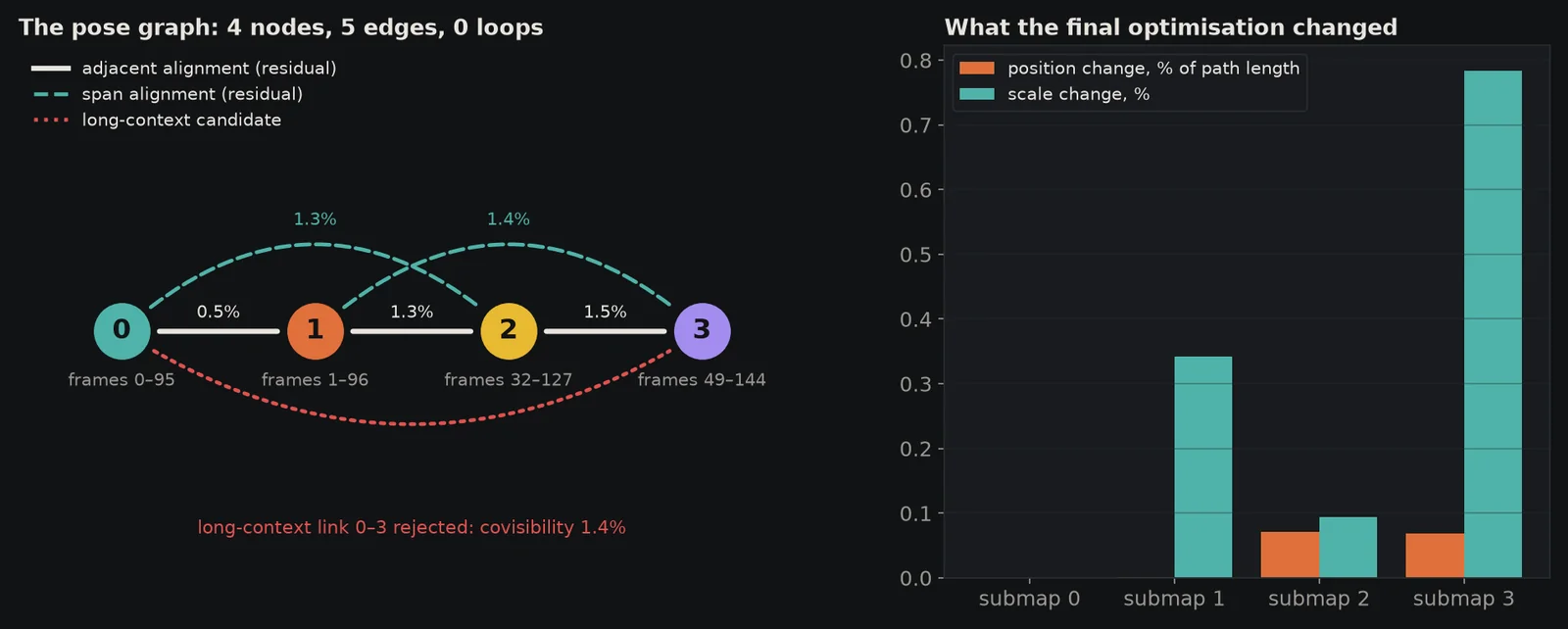
Each submap becomes a node; each alignment, long-context link and loop becomes an edge that says where one node should sit relative to another. A robust Sim(3) optimisation then moves the nodes until the edges agree as well as they can. With loops, this is where accumulated drift is corrected.
Here the graph has 4 nodes and 5 edges and no loops, and the chain of alignments already agreed: the optimisation moved no submap by more than 0.07% of the path length, or changed its scale by more than 0.78%, in 0.12 s.
10 · Stage 8: from depth to a map
Which pixels become points
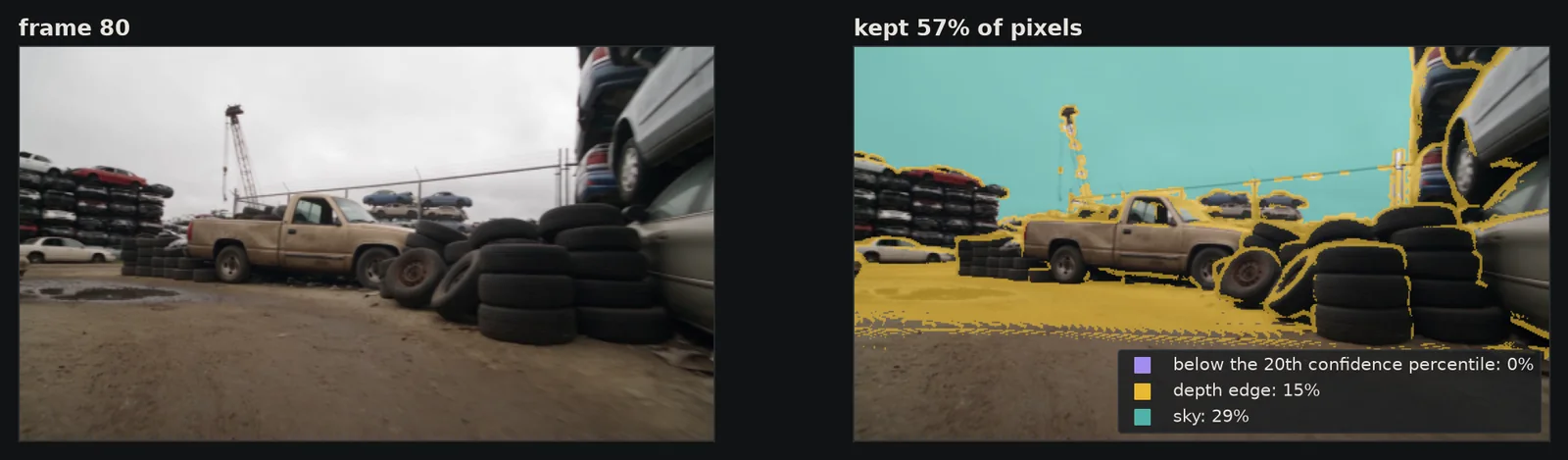
Each submap pass predicted depth for every pixel. To build the map, the recorder takes one frame in four, prefers the submap where that frame sits nearest the middle, and drops three kinds of pixel: those below the 20th percentile of the frame's confidence, those on a depth edge (a jump of more than 3% within 3 × 3 pixels, where foreground and background blur together), and sky. The rest are placed in the world with their submap's final Sim(3).
From 37 frames that gives 3,330,429 points, and 212,818 when sampling every fourth pixel; exporting took 0.18 s.
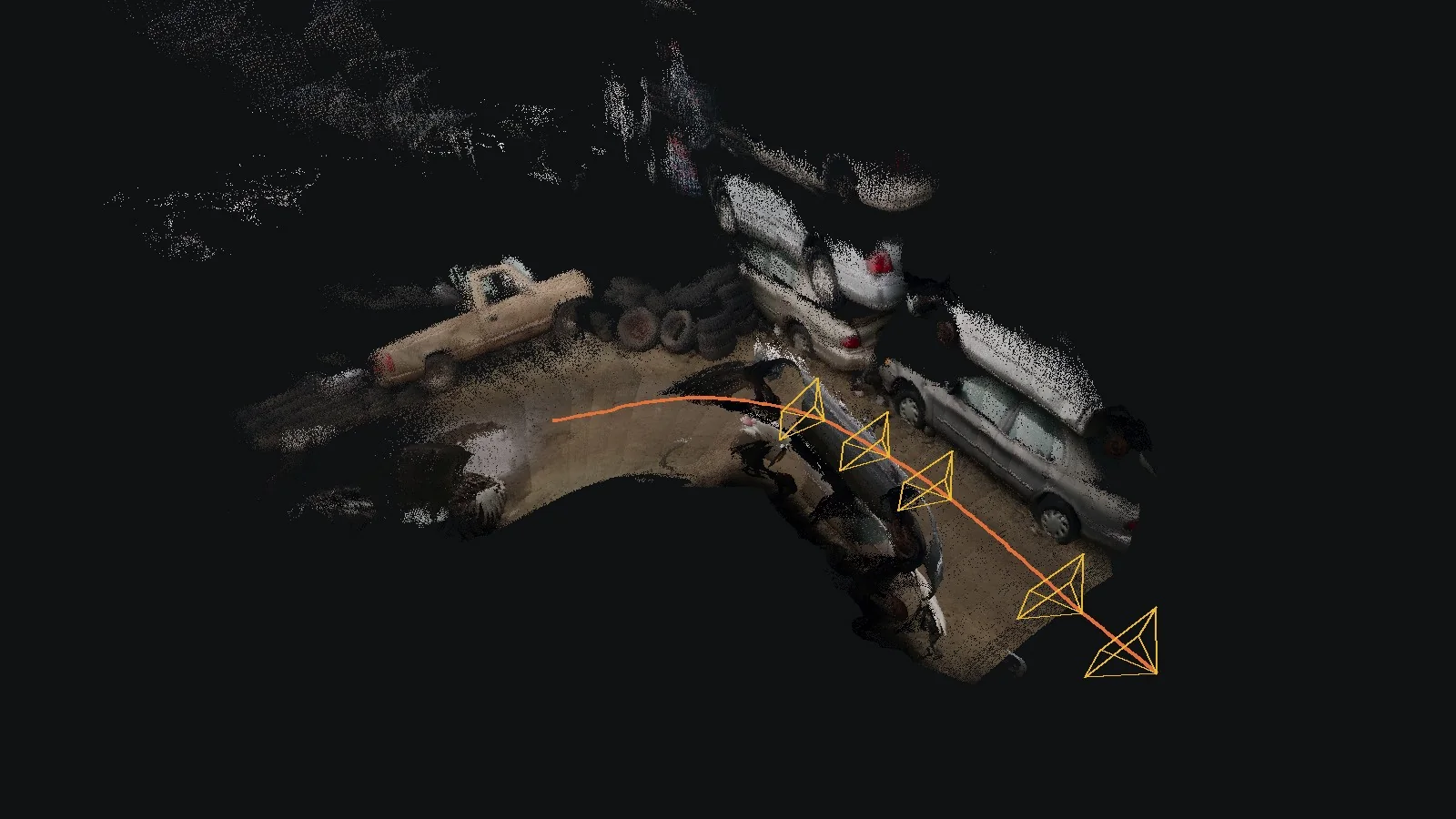
11 · Explore it in 3D
Every stage as an overlay, synced with the video
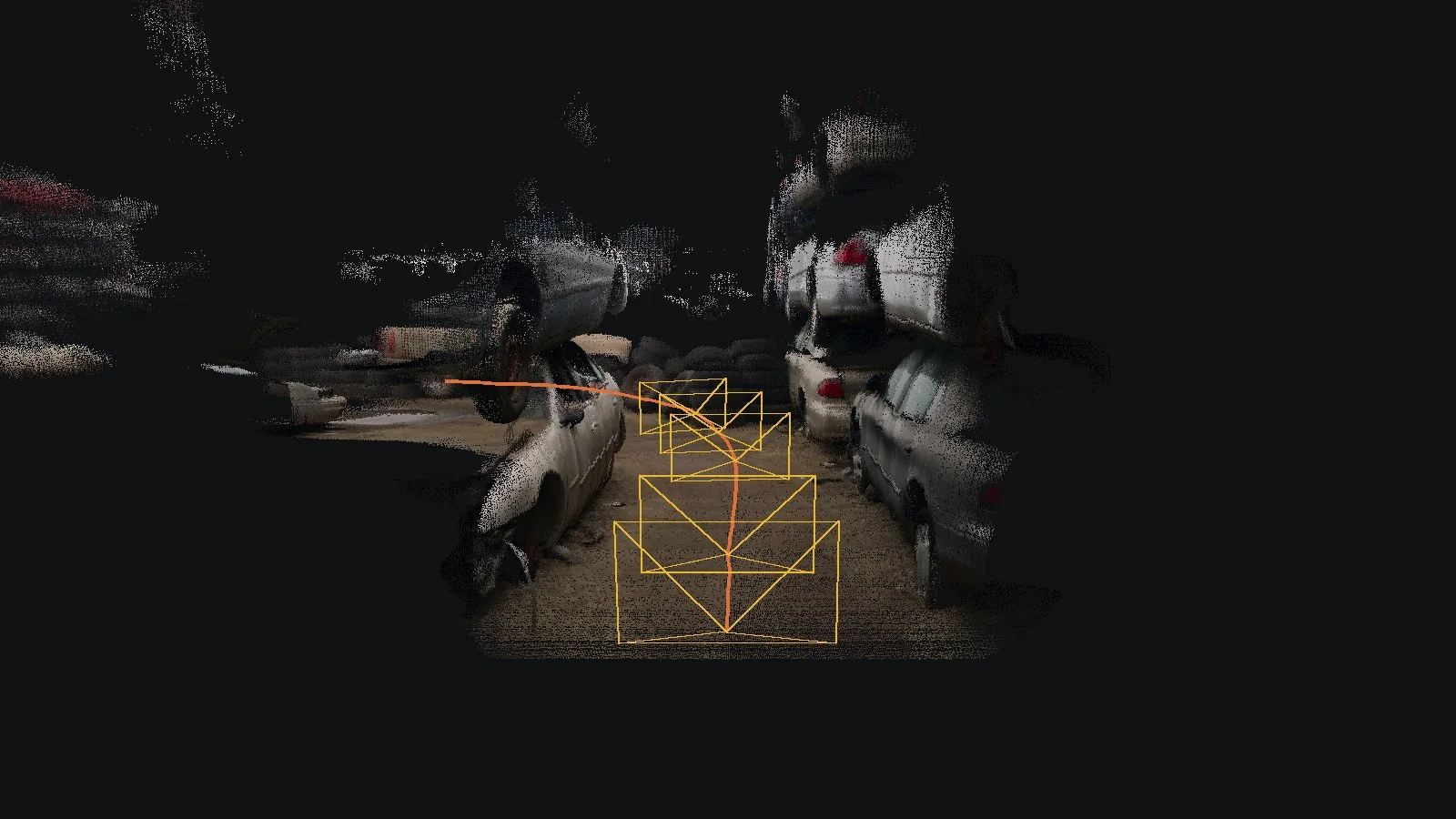
The viewer replays the run. By default it follows behind the SLAM camera: the yellow frustum is the pose SLAM computed, with the frame it was looking at on its image plane. Every recorded stage is a layer you can switch on: the front-end's four-view window, keyframes, the latest submap pass, the pose graph, loop probes, and the front-end's live estimate. Colour the points by photo, by submap, by confidence or by time. Reveal them as the camera films them, or only once the backend has committed their submap. Ego view looks through the computed camera, with a slider to blend the real frame over the map.
12 · Speed and scale
Where the time goes, and a real 13-minute walk
The whole run took 20.62 s for 145 frames, 7.0 frames per second, after 11.5 s to load the models. The two models' passes took 14.3 s of it. Throughput, not the video's frame rate, decides whether this is real time: at about 6 to 7 frames per second it keeps up with a camera sampled at 5 Hz, and falls behind a 24 fps clip by 3.4×.
| Stage | Seconds | What ran |
|---|---|---|
| 2 · Front-end | 4.94 | 144 DA3-Small passes over 2 to 4 views (3.99 s in the model) |
| 3 · Submaps | 9.28 | 6 DA3 Giant passes over 11 to 35 views |
| 4 · Stitching | 0.03 | 5 Sim(3) alignments, and 2 for the warm-up |
| 5 · Long context | 1.62 | 1 pass over 24 views, 1 covisibility check |
| 6 · Loops | 0.32 | 29 retrieval probes |
| 7 · Pose graph | 0.12 | 4 nodes, 5 edges |
| Everything else | 4.32 | image handling, re-anchoring, bookkeeping |
| 8 · Map export, after the run | 0.18 | 3,330,429 points |
Before this project we ran the authors' code on a real recording, for scale: the 13-minute Christ Church walk from the Oxford Spires dataset (2024), one camera of a handheld rig at 5 Hz, 816 m on foot, with laser-scanned ground truth. The tiles are the authors' code; the live estimate on the same walk, before and after our fix, is in chapter 4.
13 · When to use it
What it is good at, and where something else fits better
A good fit
- Ordinary video from one camera, even uncalibrated: a phone, a dashcam, a drone, a generated clip
- You want a dense coloured map, not sparse feature points
- Long routes: memory stays bounded and loops correct drift
- Scenes with moving people or cars: there is no bundle adjustment that assumes a static world
- A GPU with about 10 GB or more
A poor fit
- Tracking at 30 Hz or more, for control: about 6 to 7 frames per second here
- Running on a robot's CPU or an embedded board: classical visual-inertial SLAM is far lighter
- True metric scale from one camera: use its RGB-D, stereo or LiDAR modes, or an IMU
14 · Swapping a stage
Where each stage lives, and what could replace it
The tracer (src/world_sandbox/slam/trace.py) wraps the methods below without editing them, and
saves what each returns; the two fixes we made to the code itself (chapter 4) are in our fork. That record is the contract for replacing a stage: a new front-end, model
or retrieval method can be run on the same video and compared stage by stage, in the same figures and the
same viewer.
| Stage | Upstream code | What the trace keeps | Could be swapped for |
|---|---|---|---|
| 1 · Frames | datasets/demo.py | the 145 input images at 518 × 294 | another resolution or undistortion |
| 2 · Front-end | FrontEnd.track | pose, keyframe, views, overlap and scale per frame | a stronger small model, IMU fusion, classical odometry |
| 3 · Submaps | _new_submap → model.DA3 | poses, depth, confidence, sky and intrinsics per view | VGGT-Ω (--model_name omega, built in), other feed-forward models |
| 4 · Stitching | _align_pair, tools/align.py | each Sim(3), frames shared, residual | other robust estimators |
| 5 · Long context | _long_context_window, tools/covis.py | windows, covisibility scores, edges | another covisibility test |
| 6 · Loops | _loop_query, _verify_loop | probes, scores, candidates, verdicts | MegaLoc or SALAD retrieval (built in) |
| 7 · Pose graph | _optimise, tools/pose_graph.py | submap poses before and after | another optimiser, online mode |
| 8 · Map | MapRecorder (our subclass) | points with source frame, submap and confidence | meshes, Gaussian splats |